What Does a Squarespace Website Really Cost?
Table of Contents

Like this post? Pin it!
Here's one of my favorite things about Squarespace: once your site is built, it mostly just... runs. No plugin updates. No security patches. No developer on retainer to keep the lights on. (If you've ever had a WordPress site break at 11pm the night before a launch, you know exactly what I'm talking about.)
But "no maintenance costs" isn't the same as "no costs." So what should a Squarespace website cost?
Your Squarespace membership is just one line item. If you're a coach, consultant, or speaker, your website needs a few other marketing tools to actually do its job — which is turning visitors into leads, clients, and customers.
That's why understanding the full cost matters: if you want a professional, conversion-focused site that reflects your expertise and supports business growth, you need to budget for more than the monthly Squarespace plan.
So let's add it all up:
Your Squarespace plan
Your domain name
A web designer or template
Email marketing software
Calendar booking software
And then we'll get into what each of those typically costs, how to budget for building and maintaining a conversion-optimized Squarespace website, and what you should realistically expect to pay.
The Short Answer
If you want the TL;DR:
To keep your site running: Roughly $650–$700/year for the setup I recommend (plan, domain, professional email, email marketing, and a booking tool).
To build it in the first place: Anywhere from $0 to $10,000+, depending on whether you DIY it, use a template, or hire a designer.
That second number is where things get interesting. Let's break it all down.
Note: Prices current as of October 2026. Software companies love to change their pricing, so double-check the linked pricing pages before you buy.
1. Your Squarespace Plan
Squarespace offers four plans, and the platform generally includes hosting, SSL security, templates, basic SEO tools, and analytics as standard benefits. Paying annually usually saves about 25% to 35% compared with monthly billing, so I always recommend being billed annually.
Squarespace accounts vary in price and features — Here's what each costs and what you actually get for the money. (Full comparison on Squarespace's pricing page.)
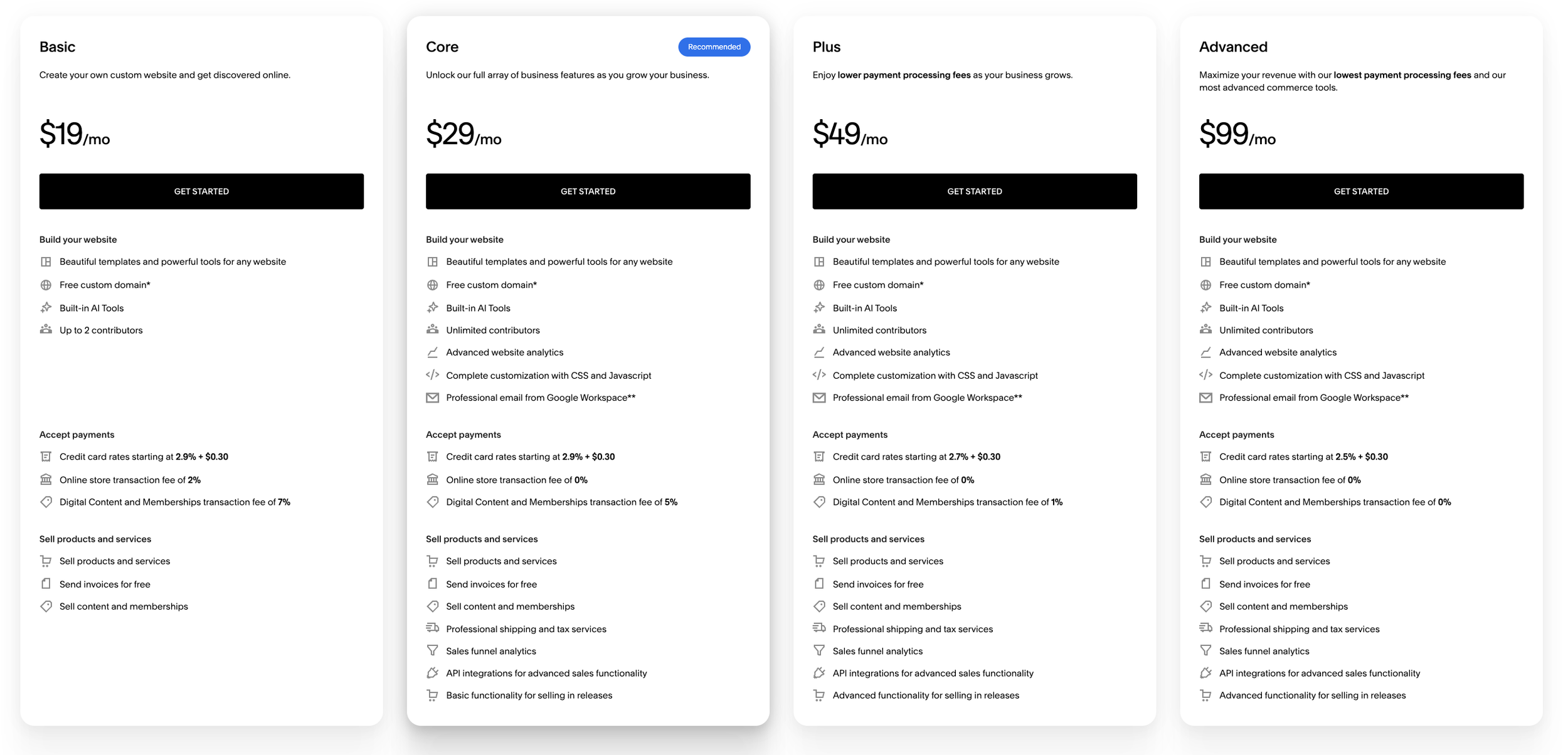
Squarespace’s Pricing and Plan Options
Basic Plan: $19/mo billed annually ($228/yr) or $25/mo paid monthly ($300/yr)
This is the cheapest option, but it's usually not the one I recommend. Two big reasons:
You can't use code injection or JavaScript in code blocks. That sounds like tech jargon (it is), but it matters: it's what lets you embed a Calendly scheduler or a third-party email signup form right on your page. On Basic, you're stuck linking out instead. (Squarespace's help doc on this, if you want the nitty-gritty.)
No professional email address included. If you want you@yourbusiness.com (and you do — a Gmail address doesn't exactly scream "expert"), you'll need to buy Google Workspace separately at $7/mo paid annually ($84/yr) or $8.40/mo paid monthly ($100.80/yr).
There are a couple of other drawbacks, too: digital products like courses are hit with a 7% transaction fee, and any products or services you sell through your site carry a 2% fee.
Core Plan: $29/mo billed annually ($348/yr) or $39/mo paid monthly ($468/yr)
This is the plan I recommend most. Why?
Full code access, so you can embed your scheduler, signup forms, and anything else your site needs.
A free year of Google Workspace email (a ~$84–$100 value). Heads up: it's free for the first year only, then you'll pay Google's regular rate.
Lower fees: 5% on digital products like courses (instead of 7%), and no Squarespace fee on products and services sold through your site. Squarespace also lets users sell unlimited products, which makes this a practical commerce option as your offers grow.
Online stores on this plan also include inventory management tools, so it can support a larger product catalog without adding complexity.
Plus Plan: $49/mo billed annually ($588/yr) or $65/mo paid monthly ($780/yr)
The main difference from Core is lower transaction fees. Plus also adds more flexibility for e-commerce sites, including customizable checkout options. Credit card processing starts at 2.7% + $0.30 (vs. 2.9% + $0.30 on Basic and Core), and courses and memberships carry a 1% fee instead of 5%. E-commerce analytics can also help track sales performance as volume grows.
If you're selling a lot through your site — especially courses or memberships — Plus can actually end up being the cheaper plan.
Advanced (e commerce) Plan: $99/mo paid annually ($1,188/yr) or $139/mo paid monthly ($1,668/yr)
Again, it's all about fees here: credit card processing drops to 2.5% + $0.30, and there's no fee at all on courses and memberships. This one's really for folks doing serious sales volume through their site.
So which plan should you pick?
For most coaches, consultants, and speakers: you'll want the Core Plan, at $348/yr. It gives you everything you need and nothing you don't. Only move up to Plus or Advanced once your sales volume makes the fee savings worth it.
2. Your Domain Name
Good news: every annual Squarespace plan comes with a custom domain free for the first year. If you don't have a website yet (or you're moving to a new domain), take advantage of that deal. Note that it's annual plans only — pay monthly and you'll pay for the domain from day one.
After that first year, domain renewals can renew automatically at about $10 to $70 per year (but usually $20 or less) depending on the extension, so be sure to account for the type of domain you choose through Squarespace Domains.
Already have a domain? You've got two options: transfer it to Squarespace and pay their rate, or keep it with your current provider and connect it to Squarespace. Either way, unless it's a domain in high demand, you shouldn't be paying much more than about $20/yr.
3. A Web Designer or Template
This is the biggest variable in the whole equation, so let's look at your three options.
Option 1: DIY the whole thing — $0
You don't need a designer or a paid template to get started. Squarespace has free templates and AI tools to get you off the ground with a computer, an internet connection, and the builder itself. And Squarespace templates are responsive across devices, which helps a new website look polished on phones and desktops.
With that said, building a site that's both beautiful and conversion-focused is a lot of effort and genuinely hard to do without help. I don't recommend this route: it'll cost you more time up front, and more money in the long run in the form of leads and clients your site never converts. It's not about being bad at this — it's that you haven't had a framework to follow.
If you do want to go this route, I recommend at least starting with my book — The Launch Framework Handbook — which will give you a framework to follow.
Option 2: Hire a web designer — $500 to $10,000+
The range here is huge, and it depends on the complexity of your project and the level of expertise you're hiring. In the current market, professional design agencies often charge from $5,000 to well over $20,000 for a custom site. For small business owners and solopreneurs, that's not always the right fit.
Launch It & Love It Website Intensives are $7,500 and get you a complete, custom-built, conversion-focused site within two weeks, with only a few hours of your time. You can certainly invest more or less than that, depending on who you work with.
Option 3: Use a premium template — about $99 to $1,299
Premium templates give you everything you need right out of the box: your pages, sections, and elements are already built, so you just paste in your copy and images, customize your fonts and colors, and you're done.
This is the great middle ground between paying thousands for a designer and going it completely alone.
Launch It & Love It templates are $495 and include a course that walks you through every step along with other resources. They're built specifically for coaches, consultants, and speakers, using the same framework I use with my custom clients.
(Our templates also include 60 days of support so you can get your questions answered, plus an extended 6-month trial of Squarespace and 20% off your first year.)
And if that still feels like a big lift? You can get a template plus a Done-With-You Day for $1,295. That's a three-hour Zoom session where we build out your site together — honestly one of the most cost-effective ways to get an expert designer in your corner.
4. Email Marketing Software
A website alone isn't enough. Most visitors won't be ready to hire you the first time they land on your site, so you need a way to collect their info and stay in touch over time. For that, email marketing is king.
Squarespace Email Campaigns
Squarespace has its own built-in email tool, Squarespace Email Campaigns. It starts at $8/mo paid annually ($96/yr) or $12/mo paid monthly ($144/yr) for up to 500 emails per month.
Quick math on what "500 emails" means:
One monthly email to 500 people
Two monthly emails to 250 people
A weekly email to about 125 people
As your list grows, so does the price. 10,000 sends per month runs about $20/mo paid annually ($240/yr) or $28/mo paid monthly ($336/yr). You can calculate your own costs on their pricing page.
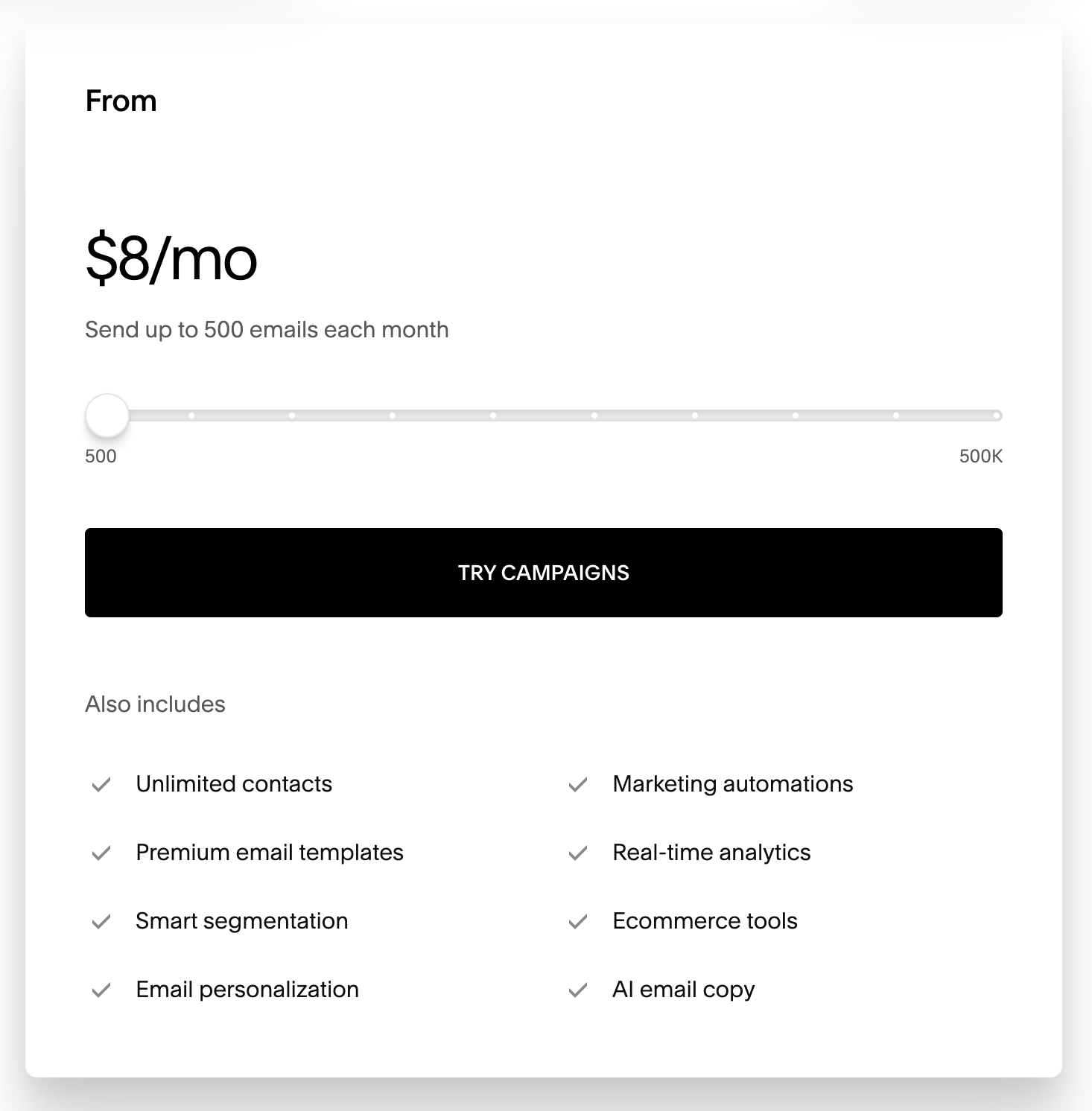
Squarespace Email Campaigns pricing calculator
Third-party options
There are plenty of other popular email providers, most with similar sliding-scale pricing:
Flodesk: The most popular plan starts at $25/mo (paid annually) for up to 1,000 subscribers.
Mailchimp: About $45/mo for up to 1,500 subscribers.
MailerLite: Starts at $10.80/mo (paid annually) for up to 500 subscribers and 5,000 monthly emails.
(Remember: embedding a third-party signup form requires the Core plan or higher.)
Depending on your list size, it's reasonable to expect to pay anywhere from about $8 to $100 a month for email marketing.
5. Calendar Booking Software
For most service providers, the first step in the sales process is a call to see if you're a good fit. A contact form just doesn't cut it here — every back-and-forth email is a chance for your potential client to lose momentum. You want an embedded (or linked) scheduler that makes booking frictionless for both of you.
Acuity Scheduling by Squarespace
Squarespace's own scheduling tool is Acuity Scheduling. The Starter plan includes one bookable calendar for $16/mo paid annually ($192/yr) or $20/mo paid monthly ($240/yr).
Need more than one calendar? The Standard plan is $27/mo paid annually ($324/yr) or $34/mo paid monthly ($408/yr), and includes up to six calendars plus perks like text message reminders.
Calendly
There are other options out there, too. My favorite of the bunch is Calendly. It has a free tier (one event type, limited features) and a Standard plan at $10/mo paid annually ($120/yr) or $12/mo paid monthly. Standard gets you unlimited event types, multiple connected calendars, the ability to take payments through your booking page, and more.
A Few Costs I'm Not Counting
To keep the math simple, I've left a few things out. Some are optional and some depend a lot on your situation, but they're worth knowing about:
Professional photos. If there's one "extra" I'd push you to spend on, it's a good headshot. Grainy selfies read as amateur, and high-quality photos of you build trust faster than almost anything else on your site. (Speakers: photos or video of you on stage are gold.)
Stock photography. Usually free. Unsplash, Pexels, and Canva all have plenty of great options.
Fonts. Also usually free. Squarespace's built-in fonts will cover almost everyone, so you only pay here if you fall in love with a premium typeface.
Payment processing fees. If you take payments through your site, you'll pay card processing fees on every sale (roughly 2.5–2.9% + $0.30 through Squarespace, depending on your plan). This is a cost of doing business rather than a website cost, but it's still worth factoring in.
A privacy policy. Every site should have one. You don't need to hire a lawyer, though: free online generators will get you most of the way there.
None of these should stop you from launching. Start with what you have, and upgrade as you go.
So What Should a Squarespace Website Cost, with Marketing Tools Added In?
Here's my rule of thumb: invest 5% of your annual business income in your website and marketing.
Bringing in $100,000/yr? Investing $5,000 in your site and connected tools makes sense.
Just starting out, making (or planning to make) $25,000 this year? Consider investing somewhere closer to between $1,250.
And remember: Because the life of your site will be greater than one year, and because costs drop dramatically after year one, you can usually afford to invest a little extra up front.
Here's how that can shake out in practice. All of these assume annual billing.
The done-for-you route: hire a professional designer
Squarespace Core: $348
Domain: free (year one)
Website Intensive: $7,500
Squarespace Email Campaigns: $96
Calendly Standard: $120
First year: $8,064
Every year after: about $668 (Core, domain renewal, Google Workspace, email marketing, and Calendly)
Best fit if you're established and bringing in six figures or more.
The more affordable way to work with a designer: template + Done-With-You Day
Squarespace Core: $348
Domain: free (year one)
Template + Done-With-You Day: $1,295
Squarespace Email Campaigns: $96
Calendly Standard: $120
First year: $1,859
Every year after: about $668
Lands right in the sweet spot for a business bringing in $25,000–$40,000.
The cost-effective, responsible route: premium template
Squarespace Core: $348
Domain: free (year one)
Launch It & Love It template: $495
Squarespace Email Campaigns: $96
Calendly Standard: $120
First year: $1,059
Every year after: about $668
A great fit if you're just getting started, or you're comfortable rolling up your sleeves with a clear plan to follow.
The absolute cheapest route: DIY everything
Squarespace Basic: $228
Domain: free (year one)
Design: $0 (DIY with a free template)
Squarespace Email Campaigns: $96
Calendly Free: $0 (linked, not embedded, since Basic doesn't allow the embed code)
First year: $324
Every year after: about $344 (plus another $84 if you want a professional email address)
The problem? Your website probably isn't going to work very hard for you, and you won't see much growth from it. Cheap in dollars, expensive in missed clients.
The Bottom Line
As you can see, the cost of a Squarespace website can vary pretty wildly. But here's the general expectation: with your plan, domain, professional email, email marketing, and booking software all included, plan on roughly $650–$700 a year to keep things running.
The biggest variable is how much you invest in building it.
If you want your site to act like a salesperson that drives business for you 24/7, investing around $1,000–$2,00 in your first year is a smart move. If you're more established and want something fully custom, there's nothing wrong with investing $8,000 or more — you'll just want the existing income to justify it.
Either way, the goal is the same: a site that matches your expertise and actually earns its keep.
Ready to build a site you're proud to launch? Check out the Launch It & Love It templates — built for coaches, consultants, and speakers, with a step-by-step course to guide you from blank page to launch. You can do this.

Hi, I'm David!
I've poured my 20+ years professional web design experience into delivering Website Intensives and Website Template Kits designed to help thought leaders (coaches, consultants, professional speakers) get the website they've always wished they had.